
Built by Javapixa
IT and Finance AgreeOn Every Asset Code.
Stock opname eats weeks of matching Excel to finance codes. ITAMPro by Javapixa links each IT asset to its code and lets branches count by phone.
What You Get
One asset list that IT, finance, and auditors trust.
From the day goods arrive to the day they are written off, every asset is tracked, matched to finance, and counted on time.
No More Guessing Which Code Is Which
ITAMPro suggests which finance code belongs to which asset, using invoice, PO, serial, and amount, and shows why. Finance accepts the sure ones in one click.
See Every Branch Count, Live
Start a campaign at the finance cut-off date, assign counters per branch, and watch each branch fill up instead of chasing photos in chat groups.
Branches Count Even Without Signal
Branch staff scan QR labels with an Android phone. The branch list is downloaded first, counts are saved on the phone, and they send themselves once the signal is back.
Every Asset Has a History You Can Trust
Receipt, handover, transfer, repair, count, and finance link all land on one timeline that can be added to but never edited.
Gaps Get Resolved, Not Buried
Not found, not registered, wrong location, or damaged: each variance is listed with a resolution action and a note, so nothing slips into next year.
Evidence Your Auditor Can Check
One download gives the counts, variances, resolutions, photos, and the IT and finance sign-offs, as Excel and PDF.
All Features
Everything for IT assets, from the PO to the write-off.
Every screenshot is the real ITAMPro, running with demo data for a company with 14 branches and 1,200 IT assets. Pick an area to see what it does for your team.
Start from your Excel
Bring in the spreadsheets you already have, cleaned up before anything is saved.
Columns recognised for you
Upload your IT asset Excel as it is. ITAMPro matches its columns to the right fields, shows an example from your own file for each one, and saves the mapping so next year's import takes a minute.
Problems caught before saving
Every row is checked first: duplicate serials, missing branches, unknown codes, and unreadable dates are flagged as errors or warnings, so bad data never reaches your register.
Finance register as a snapshot
Import the fixed-asset export from finance as it is, tied to its cut-off date. Re-import it later and ITAMPro shows which codes are new, changed, or removed.
Branches and rooms set up once
Import your branch list and add locations inside each branch, such as the server room or the IT store, so every asset has a precise place.
Receive and label
New devices are registered the day they arrive, linked to the PO and the invoice.
Every PO tracked to delivery
Record the purchase order once and see how much of it has arrived. What will never come can be cancelled, so the list of outstanding orders stays honest.
Serials pasted or scanned
On delivery, paste the serial numbers from the vendor's Excel or scan them with a USB scanner, one per line. ITAMPro creates one asset per serial in the branch and room you choose.
Invoices linked to the right assets
Attach one or more invoices to a PO and to the exact assets they paid for. That link is what lets finance codes be matched later without guessing.
QR labels ready to stick
Print QR labels for a whole delivery on A4 sticker sheets or a label printer, start from any position on a used sheet, or add your own label template. The QR holds only the asset number.
Match with finance
Each IT asset is linked to its finance code, with the reason shown, so both lists finally agree.
Suggestions with reasons
ITAMPro proposes which assets belong to each finance code, rates it High, Medium, or Low, and says why: same invoice number, amount fits once VAT is taken out, serial in the description. Accept the High ones in one click.
A reconciliation report finance signs
See how many finance codes are matched, waiting for review, only in finance, or only in IT, with values, filtered by branch or category, and download it as Excel.
One code, many assets, handled
A single finance code for ten switches, or one PO split across several invoices, is normal here. Each link shows who confirmed it and when, and can be undone with a note.
Rejected pairs stay rejected
When finance rejects a suggestion, ITAMPro remembers it and stops proposing the same pair, with a list where any of them can be suggested again.
Every asset's life
Who holds each device, where it is, and everything that ever happened to it.
The whole register, searchable
Search by label, serial, model, or holder and filter by branch, category, status, or warranty. Export the list to Excel whenever someone asks.
A history no one can rewrite
Each asset has a timeline from receipt: handovers, transfers, repairs, counts, and finance links, each with who and when. Entries can be added, never edited or deleted.
Handover forms signed on screen
Hand out devices with a printable handover form. The employee confirms with a tick or a signature on screen, or through a link sent by email.
Transfers that arrive on record
Ship devices to another branch with a reason and date. They stay "in transit" until the branch receives them, ticks what arrived, and can hand them straight to an employee.
Repairs and warranties tracked
Log repairs with the vendor and cost, and set warranty end dates. ITAMPro reminds your team before a warranty runs out, 90 and 60 days ahead by default.
No laptop reused before a wipe
See every device an employee holds and take them back when they leave. A returned laptop cannot be handed to someone else until the data wipe is recorded.
Stock opname
Run the yearly count across every branch from one screen.
One campaign, every branch
Pick the cut-off date, the finance snapshot, the branches, and the categories, assign counters per branch, and follow the progress as counts come in. Send a reminder to branches that fall behind.
Phone counting that works offline
Branch staff download their list, then scan QR labels with an Android phone, note the condition, and add a photo. Counts wait on the phone until there is signal and are never lost.
Count from a laptop too
Head office can count with a USB scanner or the laptop's webcam, and see which assets in the branch are still waiting to be found.
Variances listed for you
Not found, not registered, wrong location, or damaged: ITAMPro lists every variance per branch and resolves them in bulk with an action and a note, such as relocate, register, or update condition.
Missing assets investigated
Assets still missing when the campaign closes move to investigation, where each one is resolved as found, lost, or proposed for disposal, with a note.
Close and prove it
Finish the count with sign-offs, evidence, and approved disposals.
Sign-offs and audit evidence
The closing summary shows what was counted and what is still open. IT and finance sign off, and the audit evidence (Excel with every count, PDF with photos) and the final report are stored with the campaign.
Disposals approved by IT and finance
Batch missing or end-of-life assets with a reason and a method (sell, scrap, donate, or write off). Both IT and finance must approve, data-wipe proof is required, and the batch exports for finance.
Every disposal on record
Follow each disposal batch from draft to approval to completion, and print the signed destruction minutes (berita acara pemusnahan) when it is done.
Dashboard and reports
What needs attention today, and every report in one place.
What needs you, at a glance
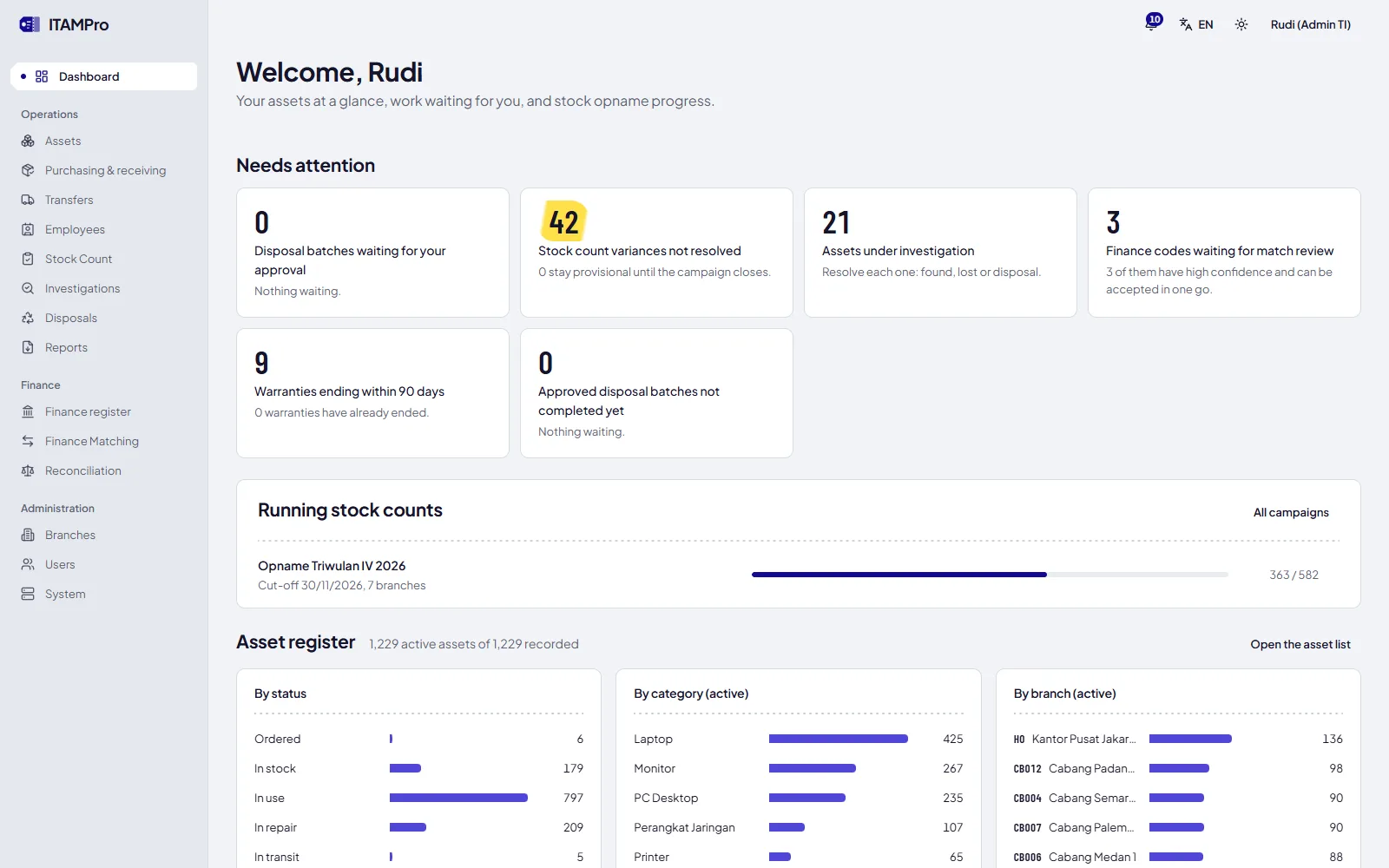
The dashboard puts open variances, assets under investigation, codes waiting for review, expiring warranties, and pending approvals first, then the running count and the register by status, category, and branch.
Every download in one menu
Asset list, reconciliation, campaign evidence and final reports, disposal exports, and a full data export, shown only to the roles allowed to open them.
Control on your server
Your data stays on your infrastructure, with clear roles and tested backups.
Five roles, branch by branch
IT admin, IT staff, finance, branch counter, and a read-only auditor. Invite users by link, and branch counters only ever see their own branch.
Your company's rules
Decide whether IT staff see finance values, which categories need a recorded data wipe, who must sign off a count, when finance must approve "mark lost", and what disposal evidence is required.
Delegation while someone is away
Lend campaign management or a disposal approval to someone else until a set date, with every action recorded "on behalf of", and choose who receives which reminders.
Daily backups you can restore
ITAMPro backs up the database and every photo daily, keeps them as long as you set, and can encrypt them. Restore from the System page, with a safety backup taken first.
Connects to your helpdesk
API tokens and signed webhooks let a ticketing system follow handovers, transfers, and disposals, and confirm a handover from its side.
How to Get It
Get ITAMPro Running in 4 Steps
Start from a system that already runs a full stock opname, set up around your branches and your finance register.
- 01
See It With Real Data
Book a demo and watch an asset go from a PO to a finance code to a scan at a branch.
- 02
Tell Us How You Work
How many assets and branches you have, your Excel list, and the format of the finance register export.
- 03
We Set It Up for You
We install it on your server, import your IT list and finance register, run the first matching with you, and add what you need.
- 04
Run Your First Count
We train IT, finance, and branch counters, and stay with you through the first stock opname.
FAQ
Questions IT Managers Ask About ITAMPro
Straight answers on installation, finance matching, counting, and price.
Still have a question?
Ask us directlyYes. ITAMPro by Javapixa is installed on your own server as one container package with a written install guide, so your asset data stays inside your company. It backs itself up every day, restores with one command or from its System page, and updates without losing data.
Close the Year With Lists That Agree.
Book a free demo of ITAMPro and see your next stock opname run on it. Start with a free consultation; we reply within 24 hours.