
Built by Javapixa
Every Minute PaidEven When You're Away.
Stopwatches and "just five more minutes" leak profit. With BillingPs by Javapixa, every TV bills itself and every sale lands in your dashboard.
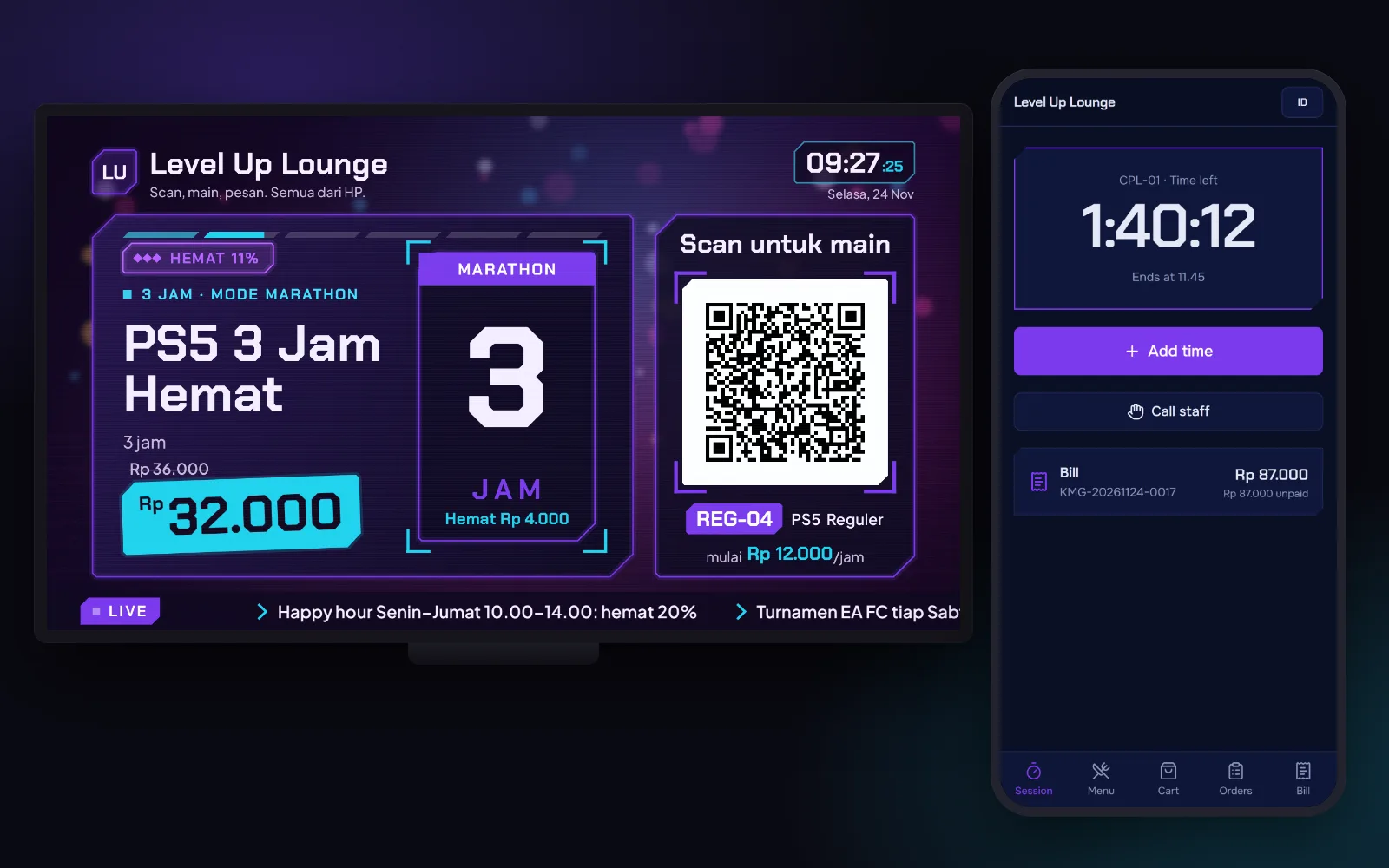
What You Get
A busier rental, with less work at the counter.
Booking, timing, snacks, and the books run themselves. Your operators look after customers; BillingPs keeps count.
Customers Book Without the Queue
Customers scan the QR on the TV, pick a package, and pay by QRIS or e-wallet, or choose to pay at the cashier. Your counter stays clear on the busiest nights.
No More Free Bonus Minutes
The TV switches to the PlayStation when a paid session starts and back to a locked screen when time is up, whoever is minding the counter.
Sell Snacks Without Pausing the Game
Customers order food and drinks from their phone. The order goes straight to the kitchen and onto the same bill as their playtime.
Idle TVs That Advertise for You
Empty stations show your packages, best-selling drinks, and the booking QR, and you can see which promo brought in a booking.
Watch Every Branch From Your Phone
The live floor, prices, stock, cash shifts, and staff for every branch, in one dashboard you can open from anywhere.
Know Which Console Pays Off
Profit per branch, station, and console after food costs, expenses, and depreciation, so you know where the next PS5 should go.
All Features
Everything your rental needs, from the TV to the books.
Every screenshot is the real BillingPs, running with demo data for a three-branch PlayStation rental. Pick an area to see what it does for your business.
Customers book themselves
Customers book and pay from their own phone, so the queue at the counter disappears on busy nights.
Scan, pick, play
A customer walks up to a free TV, scans the QR code, and sees the console, the room, and the price on their phone. No app to download, no account to make, no waiting for the operator. The code changes every minute, so only someone standing at the TV can book it.
Paid before the game starts
Customers pay by QRIS, e-wallet, virtual account, or card through Midtrans, and the TV switches on as soon as the payment clears. Prefer cash? They choose pay at the cashier, the TV holds the station, and your operator approves it in one tap.
Extra hours sold from the couch
Customers watch their time count down on their phone and add an hour before it runs out, without walking to the counter. Friends who scan the same TV join the session and can order or add time too. Need help? The Call staff button pings your dashboard.
No arguments at checkout
Playtime, extra hours, and every snack sit on one running bill the customer can see on their phone, along with where each order is. They can pay the balance from the phone or settle at the counter.
TVs that keep the time
The TV only plays when the time is paid for, and goes back to the kiosk the moment it isn't.
Empty stations still sell
An idle TV never sits black. It shows your logo, your packages, your best-selling drinks, and a big QR code with the price, so walk-ins know they can play right now.
No more free bonus minutes
When a session starts, the TV switches to the PlayStation by itself. When time is up, it switches back to a locked screen, whoever is minding the counter. If someone changes the input without a paid session, the TV goes straight back to the kiosk.
Reminders that sell another hour
Five minutes and one minute before the end, a banner pops up over the game telling players to add time from their phone, with your own offer, such as one more hour for Rp 12,000. They top up while the match is still on.
Keeps going when the internet doesn't
The TV tells customers exactly what is happening: waiting for payment, waiting for the cashier, paused, or under repair. If the internet drops, sessions keep counting down and end on time; after a power cut, the TV picks the session up where it left off.
Every TV, managed from your desk
Connect a TV with a six-character code and pick its HDMI port. See which TVs are online, test the switch, put one in service mode, and update the app on every TV without walking to each one.
Front desk control
Your operator sees every station on one screen, and you see everything your operator does.
The whole room on one screen
Every station shows its countdown and status at a glance: playing, ending soon, paused, waiting for approval, or under repair. Pay-at-cashier requests wait in their own panel with Approve and Reject buttons, so nobody gets forgotten in a rush.
Add, pause, or move in two taps
Tap a station to add time, pause for a break, end early, or move players to another console if one acts up, with their remaining time carried over. Free time needs a written reason, so bonus hours never go unrecorded.
Check the store from your phone
The overview shows today's takings split into playtime and food, how many stations are busy, unpaid bills, open orders, low stock, and offline TVs. Open it from anywhere and know how the day is going.
Every session leaves a trail
Each session records when it was booked, approved, started, extended, paused, moved, and ended, next to its bill and orders. Every action your staff takes goes into the audit log with their name on it.
A map that matches your room
Drag the station cards into the same layout as your room, zone by zone, so your operator finds the right TV instantly.
Food and drinks
Earn more from every session: customers order from their seat and it lands on the same bill.
Snacks ordered mid-match
Customers browse your menu with photos, pick the size, sugar, or spice level, and order without putting the controller down. With no trip to the counter, there's one less reason to skip the extra drink.
A kitchen that never misses an order
Orders appear on a kitchen tablet in columns from new to ready to delivered, with the station and options on every card and a sound for each new one.
Walk-in sales at the counter
Your operator rings up a take-away coffee or an order for a station from a photo menu, sends it to the kitchen, and takes payment on the same screen.
One menu, local prices
Set up the menu once for every branch, then let each branch set its own prices and hours, and mark an item sold out in one tap.
Know your real food margin
Link each item to its ingredients. When the kitchen accepts an order, the stock goes down and the cost is recorded, and an item hides itself when an ingredient runs out.
Bills and cash
Every rupiah lands on a bill, and the cash drawer matches at the end of the shift.
One bill, any payment
Playtime, extra hours, and food go on one bill. Take cash with change, QRIS, debit card, or transfer, or split it between friends.
No bill slips through
See every open bill and who it belongs to. Discounts follow presets with limits per role, and every voided item or refund is logged with the name of whoever did it.
Cash that adds up
Each shift starts with the opening cash. Every cash payment, pay-in, and pay-out is counted, and when the operator closes the shift, any shortage shows up right away. The shift report prints.
Receipts on paper or WhatsApp
Print receipts on 58 mm or 80 mm paper with your own header and footer, or send the customer a receipt link on WhatsApp.
Close the day, lock the numbers
At closing, see the day's revenue by type and payment method, food costs, expenses, and the cash difference, then lock it. Nobody but you can change a closed day.
Pricing that earns
Charge more when you're full and less when it's quiet, and let the system do the math.
Prices for every room and console
Set hourly rates for PS4, PS5, or the VIP room, with a minimum time and 15-minute steps. Add a happy-hour discount for quiet afternoons and a higher weekend rate, and every booking is priced automatically.
Packages that sell longer sessions
Offer bundles like 3 hours for less or a late-night package, limited to the rooms, consoles, days, and hours you choose. Customers see how much they save before they book.
See exactly what customers pay
Pick a station, a day, and a time to see the exact price and packages a customer will be offered, before you change anything live.
Promotions on every TV
Turn every idle TV into an ad for your packages and menu, and see which promo actually earns.
Design the screen, preview it live
Pick a layout, a background (color, image, or looping video), a ticker, and the upsell line, and see a live 16:9 preview. Use one look for the whole branch or a different one for the VIP room.
Promos that run themselves
Create slides for drinks, packages, banners, videos, or a tournament announcement. Schedule coffee for the morning and the late-night package for the evening, and a sold-out item drops off the screen by itself.
Your brand on every screen
Your name, logo, tagline, and colors appear on the TVs, the customer's phone, and the receipts, so the whole experience feels like yours.
Know which promo makes money
TVs count how often each slide is shown. When a customer scans while a promo is on screen, the booking or order is credited to it, so you see scans, bookings, and revenue for every promotion.
Stock without leaks
Know what's in the storeroom without counting it every night.
Low stock, flagged early
Every ingredient and drink per branch with its quantity, average cost, and value. Anything below its minimum is flagged before you run out on a Saturday night.
Every gram accounted for
Every sale, purchase, spill, and transfer goes into a stock ledger that can't be edited, each with a reason. Stock counts show the gap between the system and the shelf.
Purchases and transfers between branches
Log supplier purchases with the invoice, which adds the stock and can count as an expense, and move stock between branches with a send-and-receive step.
Consoles and maintenance
Your consoles are your biggest investment. Know where each one is, what it's worth, and when it needs care.
Every console, controller, and account
Record consoles, TVs, controllers, headsets, furniture, and digital accounts with serial numbers, location, purchase price, and warranty. PS Plus passwords are encrypted, and every time someone views one is logged.
What each console is worth today
See each asset's book value after depreciation, where it has been, and every repair it has had.
Broken controller? Report it in seconds
Operators report damage with a photo. If it stops a station from being played, the station goes into maintenance by itself so nobody books it, and the repair cost goes to expenses. Routine jobs like cleaning console fans every 90 days show up when they're due.
QR labels and stock-takes
Print a QR label for every asset, then walk the room and scan them with a phone to find anything missing or in the wrong place.
Reports for owners
Know your real profit per branch, per station, and per console, not just today's cash.
Revenue at a glance
Revenue by day, week, or month, split into playtime and food, with payment methods and a comparison against last period. Export any report to Excel.
Real profit, not just sales
Revenue minus food costs, expenses, and depreciation gives your actual net profit, per branch or for the whole business.
Your best and worst stations
See which stations, rooms, and console types bring in the most after food costs, depreciation, and repairs.
When each console pays for itself
Compare what each console and TV has earned against what it cost, and see when it is expected to pay itself back. Handy before you buy the next PS5.
Your busy hours, mapped
Utilization per station and a heatmap by hour and weekday show when to run happy hour and when to put an extra operator on.
What sells on the menu
Best sellers, revenue and margin per item, and how many sessions order food.
Branches side by side
Compare revenue, costs, net profit, sessions, average spend, and utilization for every branch in one table.
Every expense in one place
Record rent, electricity, internet, salaries, and marketing per branch, including bills that repeat every month, so your profit is never overstated.
Team and branches
Give each person exactly the access they need, in every branch you open.
The right access for every operator
You see everything. Managers, operators, and kitchen staff only see what their role allows, per branch, so someone can be a cashier in one branch and a manager in another.
Ready for your next branch
Add a branch with its own address, hours, prices, menu prices, stock, receipts, and payment account, and switch between branches from the top bar.
How to Get It
Get BillingPs for Your Rental in 4 Steps
No need to build a system from scratch. Start from one that already runs, then make it yours.
- 01
Watch It Run
Book a demo and watch a customer go from scanning the QR to the TV switching to the PlayStation.
- 02
Tell Us About Your Rental
How many branches and TVs you have, your TV brand, your packages, and how customers pay today.
- 03
We Set It Up for You
We put your brand on the TVs, the phone page, and the receipts, enter your prices and menu, connect your payment account, and add what you need.
- 04
Open Under Your Name
We install it on your server, help connect your TVs, and stay with you after opening day.
FAQ
Questions Rental Owners Ask About BillingPs
Straight answers on TVs, operators, payments, and price.
Still have a question?
Ask us directlyNot if your TVs already have Android TV or Google TV built in, on Android 9 or newer, such as many TCL, Sony, Xiaomi, Philips, and Hisense models. BillingPs by Javapixa runs as an app on the TV itself. Streaming sticks and Chromecast won't work, because they can't switch the TV's own HDMI inputs.
Let the TVs Keep Time, You Grow the Business.
Book a free demo of BillingPs and see it running for a rental like yours. Start with a free consultation; we reply within 24 hours.